My Credentials
The My Credentials tab is where you record your professional role, licenses and certifications, and your tenure. This information helps your organization understand its team's experience and qualifications.
Note: This tab only appears for admin and staff account types. Standard learner accounts do not see it. Your organization can also turn the tab off, so it may not be visible even on eligible accounts.
Accessing My Credentials
- Click your profile icon in the top-right corner and select My Profile.
- Click the My Credentials tab.
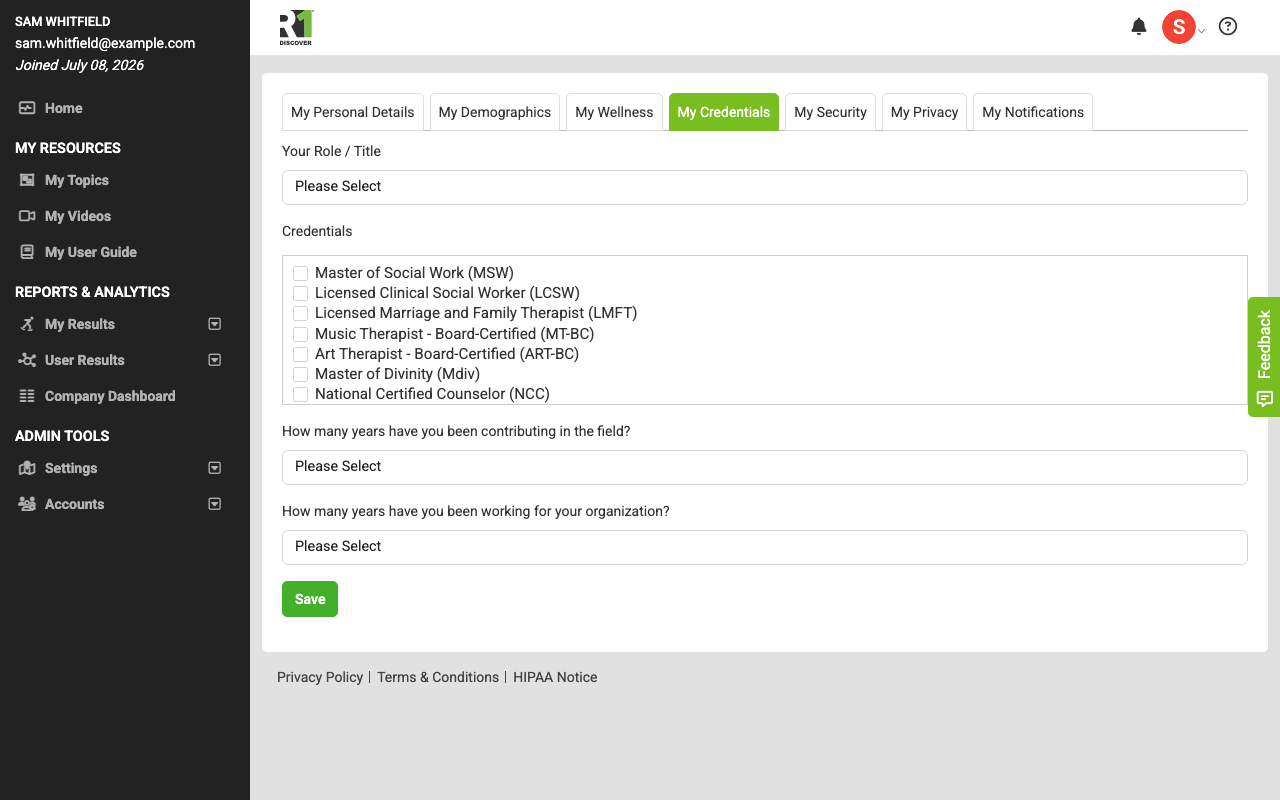
Updating your credential fields
The available options in each field are configured by your organization, so the exact choices you see may vary.
- Your Role / Title — select your current role or title from the dropdown.
- Credentials — check every license or certification that applies to you. You can select more than one.
- How many years have you been contributing in the field? — select the option that best matches your total experience in the field.
- How many years have you been working for your organization? — select the option that best matches your time at your current organization.
- Click Save to store your changes.
Was this helpful?
Thanks for the feedback!